Tool · Desktop · Windows + macOS
Aptamer Analysis Tool
适配体序列分析工具
A desktop application for aptamer sequencing data analysis — sequence trimming, pattern recognition, clustering, and structured reports from FASTQ data, tuned for routine lab use and long-running batches.
面向适配体测序数据的桌面分析软件,支持 FASTQ / FASTQ.GZ 文件的序列 trim、模式识别、聚类分析与结果报告输出,针对实验室日常处理与长时间批处理任务做了系统优化。
Free for academic use · 学术用途免费 · On Windows the Launcher installs and updates this tool for you; the macOS build is still a direct download while the macOS Launcher is in progress. · Windows 通过 Launcher 安装与更新;mac 版 Launcher 开发中,上方 .dmg 暂时保留。
/ Introduction · 介绍
What it does.这个工具能做什么。
Aptamer Analysis Tool reads .fastq, .fq, .fastq.gz, and .fq.gz files, performs sequence trimming, prepares a clustering matrix, applies EPS-based clustering, and writes structured PDF / PNG / XLSX / Word reports. Compared with the original Python workflow, this build was rebuilt for interactive performance, lower memory usage, flexible trim configuration, batch processing, and more informative output — better suited for routine lab analysis and long-running sequencing batches.
软件读取 .fastq、.fq、.fastq.gz、.fq.gz 文件,完成序列 trim、聚类矩阵准备、EPS 聚类输出与结构化报告生成(PDF / PNG / XLSX / Word)。相较于原始 Python 工作流,新版本围绕交互效率、资源占用、参数灵活性、批处理能力与报告可读性进行了系统优化,更适合实验室日常数据处理与长时间批量分析任务。
-
Fast EPS recalculation
EPS 聚类半径快速重算
After matrix preparation, changing the EPS clustering radius takes seconds instead of the ~10 minutes a full pipeline rerun used to need — making parameter sweeps practical.
矩阵准备完成后,调整 EPS 聚类半径只需秒级响应,不必重跑约十分钟的完整流程,参数探索变得可行。
-
Memory & thread optimization
内存与多线程优化
Sequence loading, distance calculation, and background scheduling were rebuilt to lower peak memory and stabilize multi-thread runs, so the tool fits more ordinary lab computers.
重写了序列读取、距离计算与后台任务调度,降低峰值内存占用,提升多线程稳定性,适配更多普通实验室电脑配置。
-
Tiered trim modes
分级 Trim 策略
Simple,Pro, andUltra— from strict standardized trim to fully custom forward/reverse primer regions with adjustable mutation tolerance.Simple/Pro/Ultra三档:从严格的标准化修剪,到可自定义引物结合区与突变容差的高灵敏度模式。 -
Multi-file batch processing
多文件批处理
Queue multiple FASTQ files with shared parameters and let the tool run unattended. Failed files are recorded but do not stop the batch.
支持队列式批处理多个 FASTQ 文件,共享同一组参数,无人值守运行。单个文件失败会记录但不会中断整个批次。
-
Real sequence-context reporting
真实序列上下文报告
PDF / PNG output replaces the old fixed placeholder (e.g.
GACGAC---GTCGTC) with the real six bases observed upstream and downstream of the target region, making boundaries easier to validate.PDF / PNG 报告不再使用固定示例片段(如
GACGAC---GTCGTC),而是写入实际数据中目标区域前后各 6 个真实碱基,便于检查边界与聚类可信度。 -
Local-first, no telemetry
本地处理,无遥测
Normal operation makes zero network calls. Inputs, outputs, and logs all live on your machine; nothing is uploaded.
正常运行不发起任何网络请求,输入文件、输出文件与日志全部保留在本机,不上传任何数据。
/ Usage · 使用方式
How to use it.单文件分析流程(Single File Mode)。
The most common workflow is Single File Mode — interactive analysis for one sequencing file, ideal for tuning trim parameters and exploring EPS values. The other three modes (Batch, Manual, Motif Search) share the same input/output shape and are summarized at the end of this section.
最常用的是 Single File Mode,适合调整 trim 参数与探索 EPS。另外三种模式(Batch、Manual、Motif Search)输入输出结构一致,在本节末尾汇总说明。
-
01
Launch & pick a workflow
启动并选择工作方式
Open Aptamer Analysis Tool from the Start menu or desktop shortcut. After the splash screen, the main menu offers four workflows:
Single File Mode,Batch / Multi-File Mode,Manual / Paste Sequences, andMotif Search. PickSingle File Mode.从开始菜单或桌面快捷方式打开软件。启动页过后,主菜单提供四种工作方式:
Single File Mode、Batch / Multi-File Mode、Manual / Paste Sequences、Motif Search。选择Single File Mode。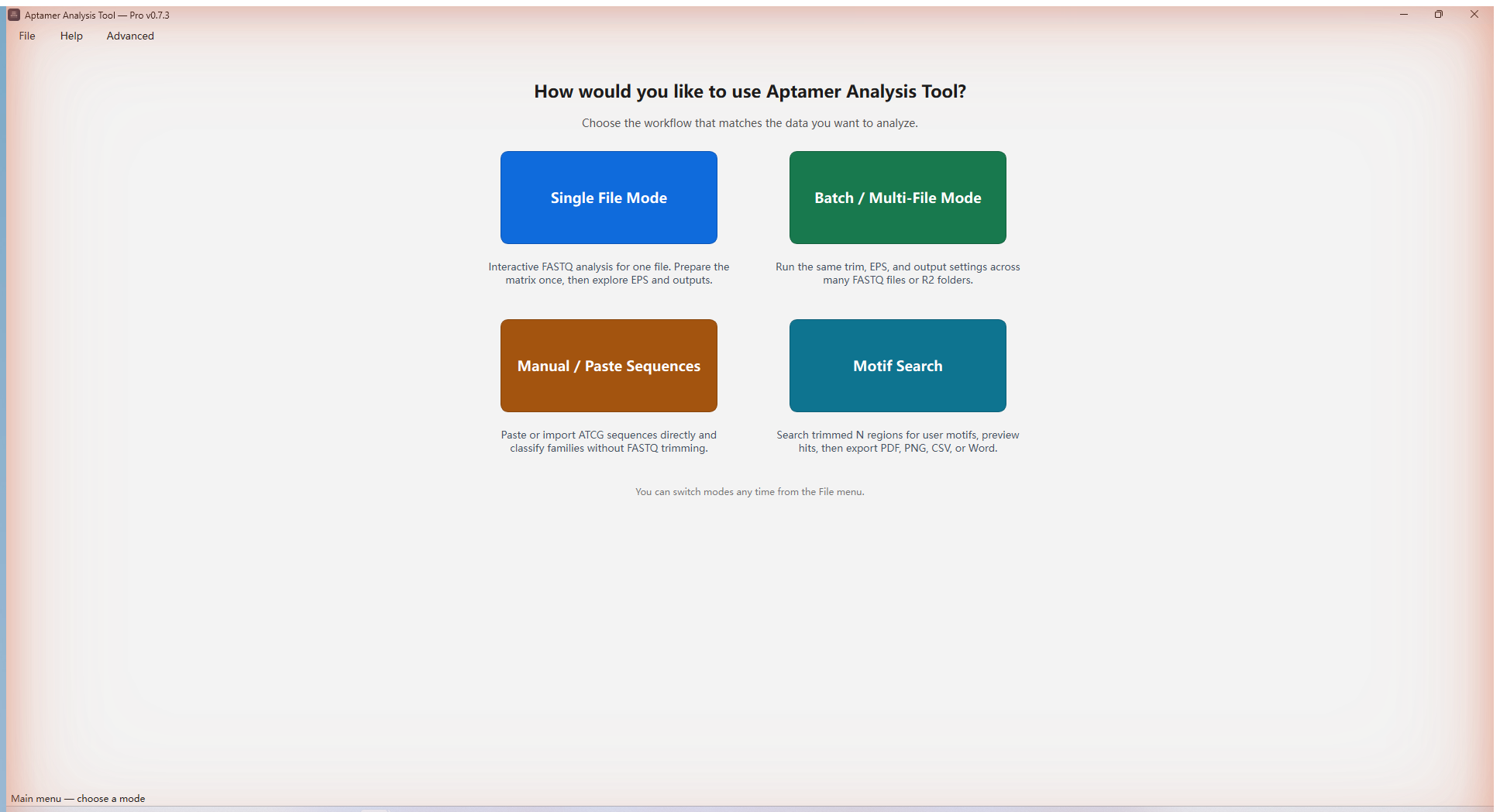
Fig. 01 — Main menu · 主菜单(四种工作方式) -
02
Choose a sequencing file
选择测序文件
Click
Choose Fileand pick a.fastq/.fq/.fastq.gz/.fq.gzfile. The tool decompresses.gzautomatically and previews the first 5 FASTQ records along with file name and size. ClickNextto continue.点击
Choose File,选择.fastq/.fq/.fastq.gz/.fq.gz文件。.gz文件无需先解压,软件会自动处理,并显示文件名、大小及前 5 条 FASTQ 记录预览。确认无误后点击Next。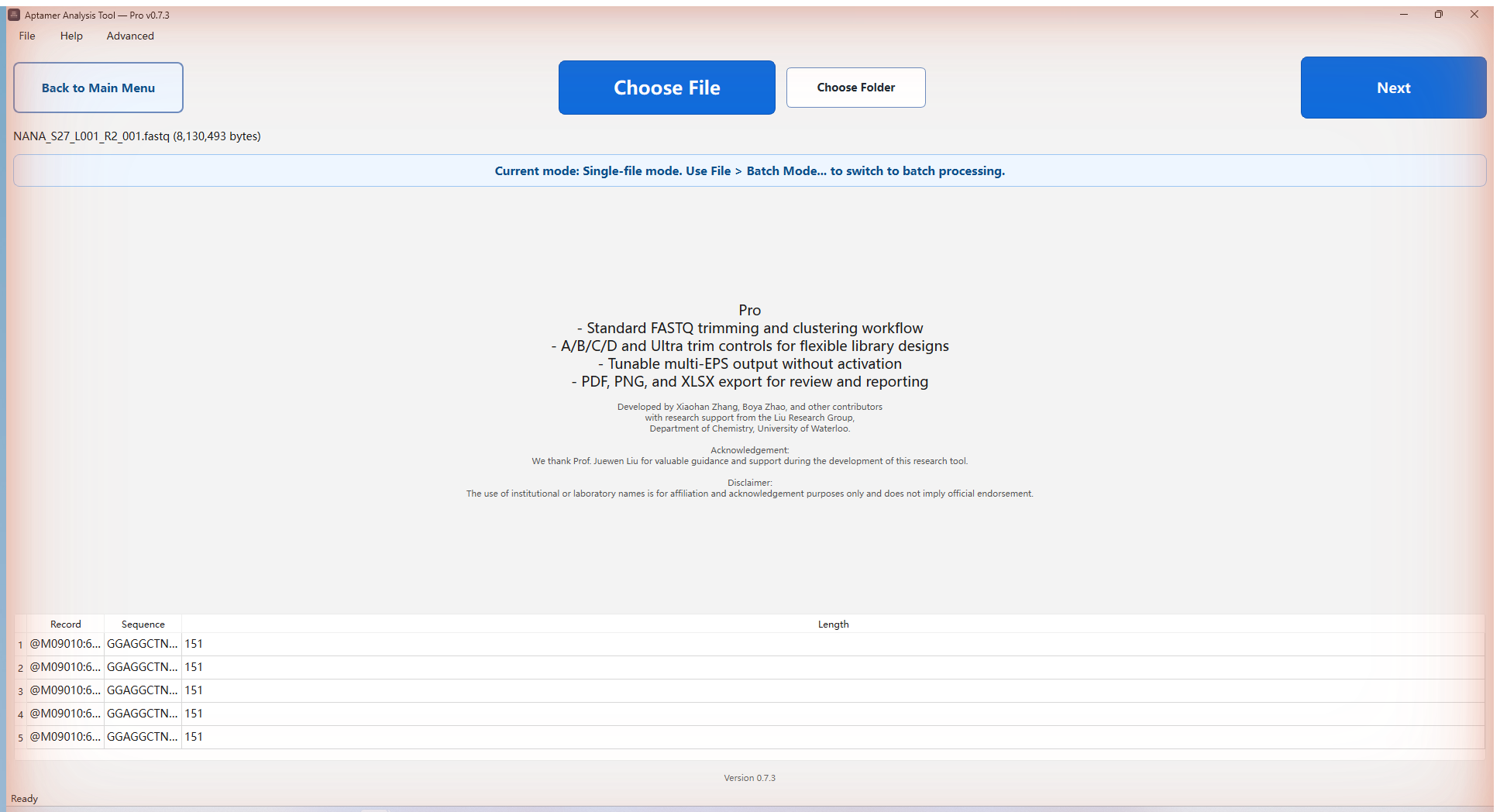
Fig. 02 — Choose file & preview · 选择文件与预览 -
03
Set trim parameters
设置 Trim 参数
Pick a trim mode.
Simpleuses fixed flanksGGGACGAC+GTCGTCCCGwith strict matching.Pro(A/B/C/D) lets you set Minimum and Maximum target-region lengths and adjust front/rear mutation tolerances (typical defaults: C=0, D=3).Ultraaccepts fully custom forward and reverse primer-binding regions for non-standard libraries.选择 trim 模式。
Simple使用固定前后端序列GGGACGAC+GTCGTCCCG严格匹配;Pro(A/B/C/D 模式)允许设置目标区域 Minimum / Maximum 长度并调整前后端容差(推荐 C=0, D=3);Ultra支持完全自定义前后引物结合区,适配非标准文库。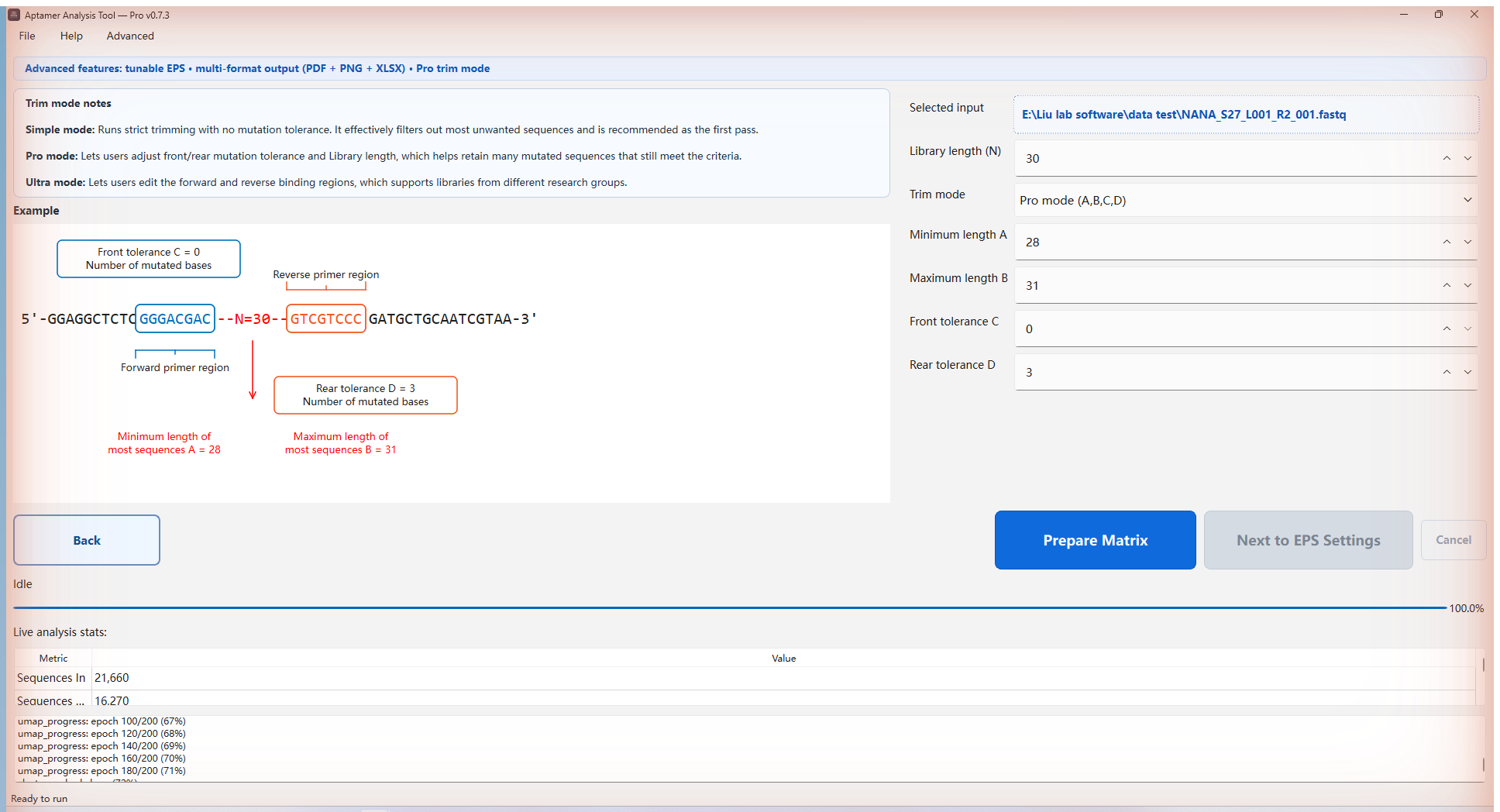
Fig. 03 — Trim parameters · Trim 参数设置 -
04
Prepare matrix
准备聚类矩阵
Click
Prepare Matrix. This is the slow part: reading the file, trimming reads, computing the distance matrix, and building clustering coordinates. Large files take longer. You canCancelat any time; wait for the interface to return to Ready before starting again.点击
Prepare Matrix,这是最耗时的一步:读取文件、执行 trim、计算距离矩阵并建立聚类坐标。大文件耗时较长。可随时Cancel,但需要等待界面回到 Ready 后再开始下一次运行。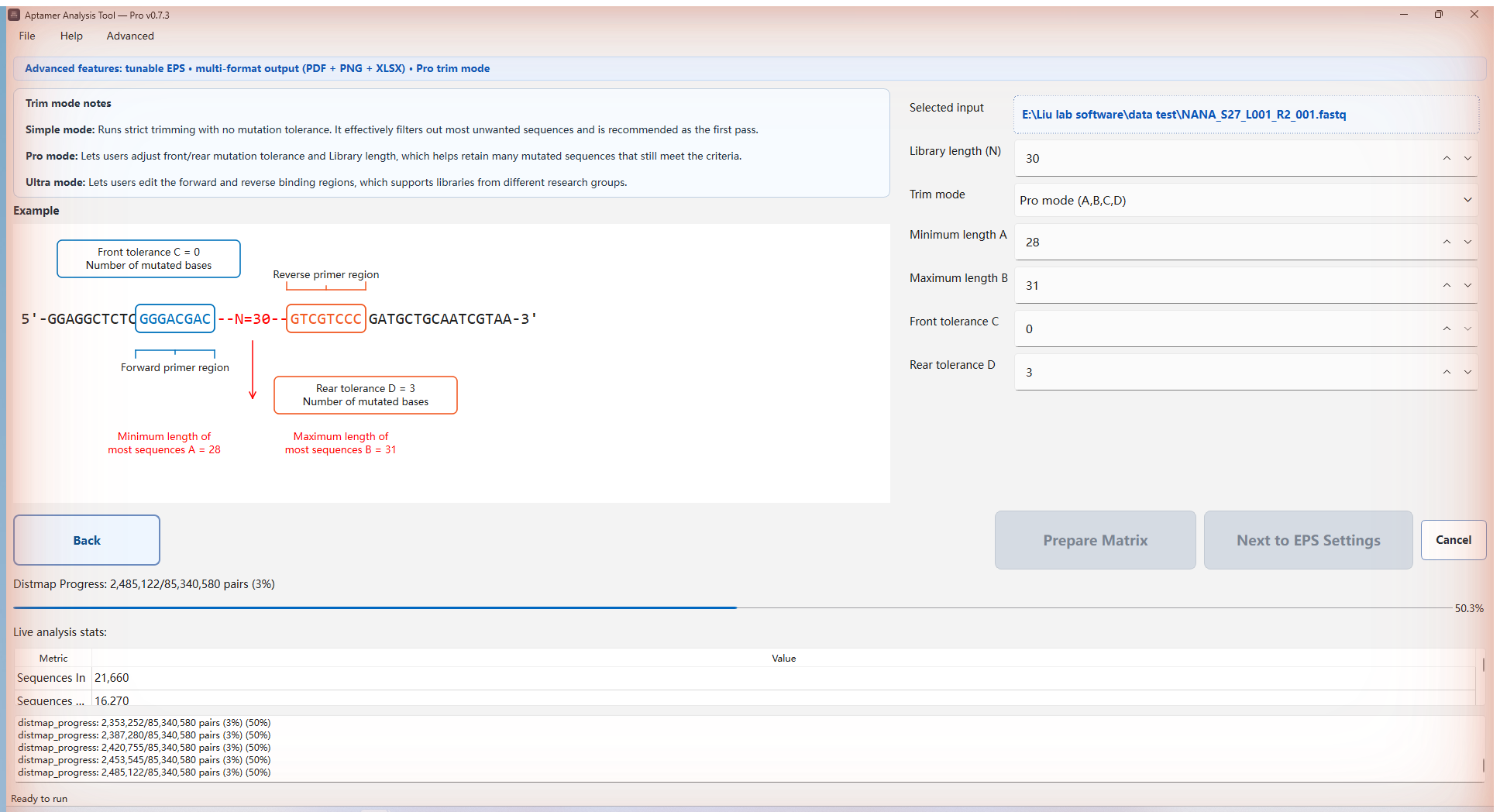
Fig. 04 — Prepare matrix · 准备矩阵进度 -
05
Set EPS & generate output
设置 EPS 与生成输出
On the output page, enter one or more EPS values (e.g.
0.80, 1.25, 1.50; supported range0.20–2.20), choose the output folder, and pick formats: PDF / PNG / XLSX / Word. Lower EPS is stricter and emphasizes conserved bases; higher EPS is more permissive. ClickGenerate Output.在输出页面输入一个或多个 EPS 值(例如
0.80, 1.25, 1.50,支持范围0.20–2.20),选择输出文件夹与导出格式(PDF / PNG / XLSX / Word)。EPS 越低聚类越严,越能突出保守碱基;EPS 越高越宽松。设置完成后点击Generate Output。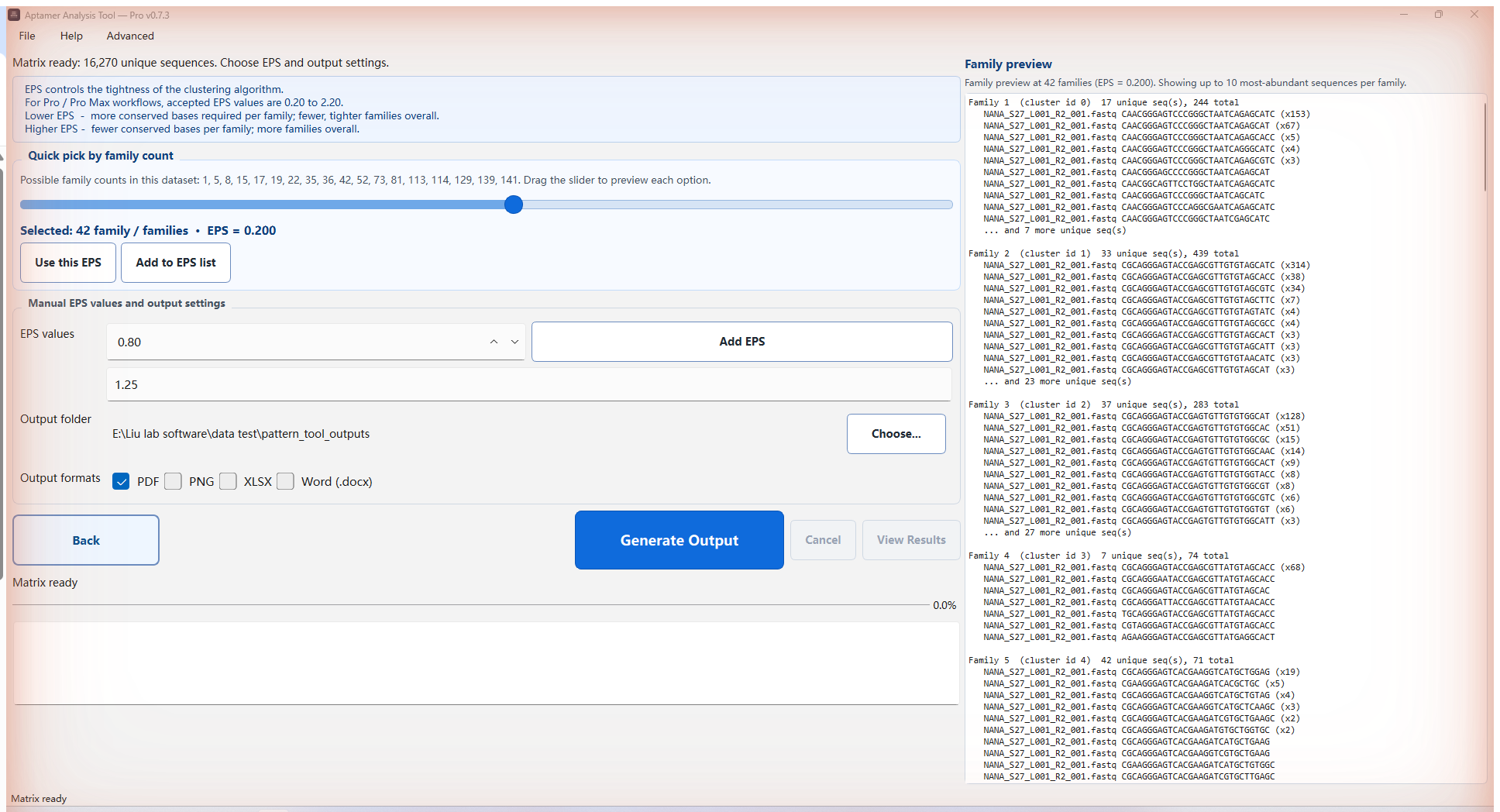
Fig. 05 — EPS & output formats · EPS 与输出格式 -
06
Review & re-run with new EPS
查看结果并用新 EPS 重跑
On the result page, click
Open Folderto inspect outputs (named likesample-EPS08.pdf,sample-EPS125.xlsx) orExportto save a run summary. Since the matrix is already prepared, you can return to the output page and re-runGenerate Outputwith different EPS values in seconds.结果页面可点击
Open Folder打开输出文件夹(文件名形如sample-EPS08.pdf、sample-EPS125.xlsx),或点击Export导出运行摘要。由于矩阵已准备好,可直接回到输出页面以新的 EPS 重新点击Generate Output,秒级出结果。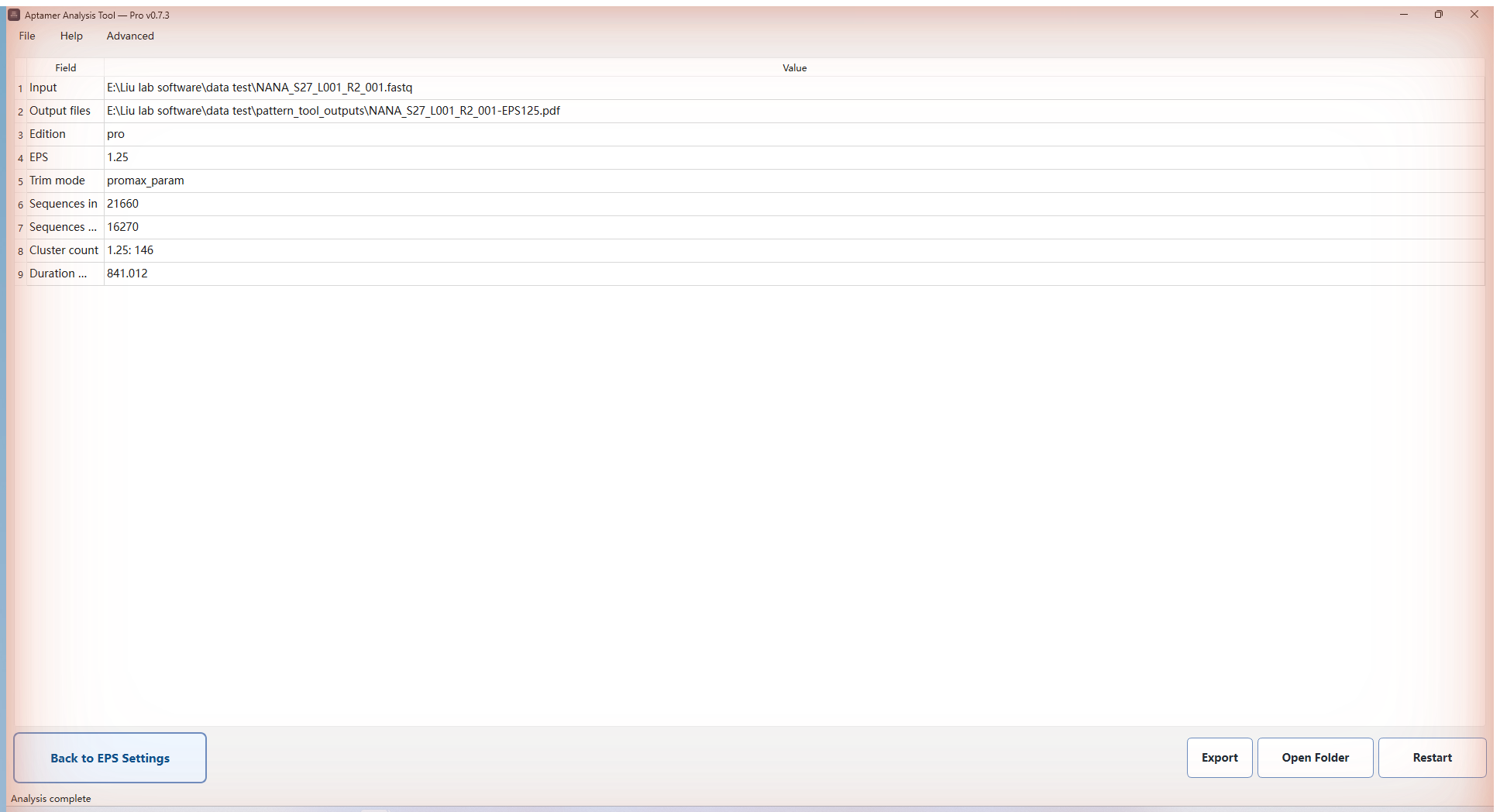
Fig. 06 — Result page · 结果页面
Other workflows in the same app.
同一软件中的其他工作方式。
-
Batch / Multi-File
Queue many FASTQ files with shared parameters; unattended runs with per-file logs.
批处理多个 FASTQ 文件,共享同一组参数,无人值守运行。
-
Manual / Paste Sequences
Paste or import ATCG sequences (txt / docx / xlsx / FASTA) and run family classification without trimming.
直接粘贴或导入序列(txt / docx / xlsx / FASTA),跳过 trim 做家族分类。
-
Motif Search
Find trimmed N-region sequences containing one or more motifs (≥4 bp) with AND / OR / AND-NOT rules.
在 trim 后的 N 区域中查找含指定 motif(≥4 bp)的序列,支持 AND / OR / 必含-必不含 规则。
/ Disclaimer · 声明
Things to know.使用前请阅读。
-
Normal operation is fully offline.
正常使用全程离线
Aptamer Analysis Tool makes no network calls during normal operation: no telemetry, no automatic update check, no automatic upload. Input file content, file names, output content, and logs never leave your machine.
正常运行期间软件不发起任何网络请求:无遥测、无自动更新检测、无自动上传。输入文件内容、文件名、输出文件与日志都保留在本机。
-
Pro Max activation sends only the minimum.
Pro Max 激活仅传输最少必要信息
The Pro Max build contacts the activation service only when the user requests an activation code by email. The request includes first/last name, the education email entered, application name and version, and a salted hash of the local machine code. Raw hardware serial numbers, file names, file content, logs, and analysis results are not transmitted.
只有 Pro Max 用户主动请求邮件激活码时,软件才会联系激活服务。请求只包含:填写的姓名、教育邮箱、应用名与版本、以及本机机器码的加盐哈希值。原始硬件编号、文件名、文件内容、日志与分析结果均不会上传。
The code email can take 2–3 minutes to arrive. If it doesn't show up, it's most likely in your spam / junk folder.
激活码邮件可能需要等待 2–3 分钟。如果一直没收到,大概率在垃圾邮件(spam / 垃圾箱)里,请去那里查看。
-
Logs and crash reports stay local.
日志与崩溃报告保留在本机
Logs live at
%LOCALAPPDATA%\AptamerAnalysisTool\logson Windows and~/.pattern_tool/logson macOS / Linux. Crash files are saved alongside them. They are never sent automatically — sharing one always requires an explicit action by you.Windows 下日志位于
%LOCALAPPDATA%\AptamerAnalysisTool\logs,macOS / Linux 下位于~/.pattern_tool/logs,崩溃报告与日志保存在同一位置。这些文件不会被自动发送,分享给维护者需要你手动操作。 -
Free for academic / non-commercial use.
学术与非商业用途免费
Aptamer Analysis Tool is free for academic research and teaching. For commercial integration or redistribution, contact the author in advance.
本软件面向学术研究与教学免费使用。如需用于商业产品集成或二次分发,请提前联系作者。
-
Provided as-is, without warranty.
不提供任何形式的担保
Output is best-effort. The author is not responsible for downstream experimental decisions made on the basis of this tool's results. Validate critical findings with independent methods, and report bugs to [email protected].
输出尽力而为。作者不对依据本工具结果作出的下游实验决策负责,关键结论请用独立方法复核。Bug 与建议请发送至 [email protected]。
-
Cite if used in publications.
论文使用请引用
If this tool contributed to a published study, please cite: Zhang X. Aptamer Analysis Tool, v0.8, Liu Lab, University of Waterloo, 2026. zxiaohan.com/research/tools/aptamer-analysis.
若本工具对已发表的研究有帮助,烦请按上述格式引用。
/ Acknowledgments · 致谢
Built with the lab.和实验室一起完成。
Developed in the Bionanotechnology & Interfaces Laboratory, Department of Chemistry, University of Waterloo. The tool's features were shaped by the lab's ongoing SELEX and aptamer-engineering projects, and by the testing and feedback of every group member listed below.
本软件在加拿大滑铁卢大学化学系 Bionanotechnology & Interfaces Laboratory(刘珏文实验室)完成。功能设计由实验室正在进行的 SELEX 与适配体改造项目驱动,并经过下列成员的测试与反馈。
-

Prof. Juewen Liu
Advisor · 导师
Professor of Chemistry at the University of Waterloo, College member of the Royal Society of Canada (RSC), and Tier 1 Canada Research Chair in Biosensors & Bionanotechnology. Group lead for the aptamer / DNAzyme / nanomaterial research that motivates this tool.
-

Boya Zhao
Initial Python prototype · 最初 Python 脚本
Undergraduate at Tsinghua University (Prof. Sichun Zhang's group). Wrote the initial Python script during a research visit to Liu Lab in July 2025 — the prototype that became the algorithmic foundation of the current desktop tool.
-

Xiaohan Zhang 张霄汉
Author · Postdoctoral Researcher · 作者
Postdoctoral researcher at the University of Waterloo under Prof. Juewen Liu. PhD in Inorganic Chemistry, Shandong University (2024). Designed, implemented, and maintains the Windows build.
-

Yuanli Li
macOS port · Beta testing & feedback · macOS 适配与内测反馈
Third-year undergraduate in the Materials Nanoscience joint program (Beijing Jiaotong University × University of Waterloo). Responsible for the macOS adaptation and release, plus extensive beta testing and bug reporting throughout the 0.7.x cycle.
Special thanks to the beta testers who tried early builds, broke things, and reported back: Wenhua Shang, Jiayi Liang, Bing Jin, Yachen Xie.
特别感谢参与内测的同学:尚文华、梁嘉怡、金冰、谢亚宸。
Open-source libraries. Aptamer Analysis Tool stands on the work of these projects — sincere thanks to their maintainers:
开源依赖。本工具的实现依赖以下开源项目,特别感谢这些项目的维护者:
- PySide6
- HDBSCAN
- scikit-learn
- UMAP-learn
- ViennaRNA
- matplotlib
- NumPy
- regex
- requests
- tqdm
- cryptography
/ FAQ · 常见问题
Questions people actually ask.使用者真正会问的问题。
-
What input files does it accept?
支持哪些输入文件?
It reads .fastq, .fq, .fastq.gz and .fq.gz directly — no need to decompress large sequencing archives before analysis.
直接读取 .fastq、.fq、.fastq.gz 与 .fq.gz,不需要在分析前先解压大体积的测序归档文件。
-
What does the analysis pipeline actually do?
分析流程具体做了什么?
Sequence trimming, then preparation of a clustering matrix, then EPS-based clustering, then generation of structured reports. Trim configuration is adjustable rather than fixed, so the same build handles libraries with different primer and scaffold layouts.
先做序列 trim,再准备聚类矩阵,然后进行 EPS 聚类,最后生成结构化报告。Trim 参数可调而非写死,因此同一个版本可以处理引物与骨架布局不同的文库。
-
What formats are the reports in?
报告是什么格式?
PDF, PNG, XLSX and Word — chosen so results can go straight into a lab notebook, a slide deck, or a manuscript supplement without reformatting.
PDF、PNG、XLSX 与 Word。这样选是为了让结果可以直接进实验记录、幻灯片或论文补充材料,不必再重排。
-
Can it handle large batches and long-running jobs?
能处理大批量和长时间任务吗?
Yes — this build was rebuilt over the original Python workflow specifically for interactive performance, lower memory usage and batch processing, with long sequencing batches as the target case.
可以。相较原始 Python 工作流,本版本正是围绕交互性能、更低内存占用和批处理能力重建的,长时间测序批处理就是它的目标场景。
-
Which platforms, and what does it cost?
支持哪些平台?收费吗?
Windows through the AptaPilot Launcher, which installs and updates it for you; macOS as a direct .dmg download while the macOS Launcher is still in progress. Free for academic use.
Windows 通过 AptaPilot Launcher 安装与更新;macOS 版在 Launcher 完成前暂时提供 .dmg 直接下载。学术用途免费。
/ Citation · 引用
How to cite.如何引用。
If this tool contributed to work you are publishing, a citation is the most useful thing you can send back — it is what keeps the tool maintained and lets other people find it.
如果这个工具对你发表的工作有帮助,引用是最有用的回馈——它既是工具能持续维护的理由,也是别人找到它的途径。
APA
Zhang, X. (2026). Aptamer Analysis Tool (Version 0.8) [Computer software]. https://zxiaohan.com/research/tools/aptamer-analysis/
BibTeX
@software{zhang_aptamer_analysis_2026,
  author  = {Zhang, Xiaohan},
  title   = {Aptamer Analysis Tool},
  year    = {2026},
  version = {0.8},
  url     = {https://zxiaohan.com/research/tools/aptamer-analysis/}
}
/ Also in the toolkit · 工具集
Other tools.同系列工具。
 Web · Online
Kd Fitting Tool
Kd 拟合工具
Uses the full binding equation to fit true Kd curves. Data stays in your browser.
 Desktop · Windows · Single-file
AptaFold
适配体二级结构预测
DNA aptamer folding with Na⁺ / Mg²⁺ / K⁺ / Ca²⁺ / temperature inputs and G-quadruplex detection. Reads this tool's output directly as a batch source.
 Desktop · Windows · Experimental
Structural Family Classification
结构家族分类
Group SELEX aptamers by loop-region structure with a self-written motif-block classifier. Ingests this tool's trimmed output.